
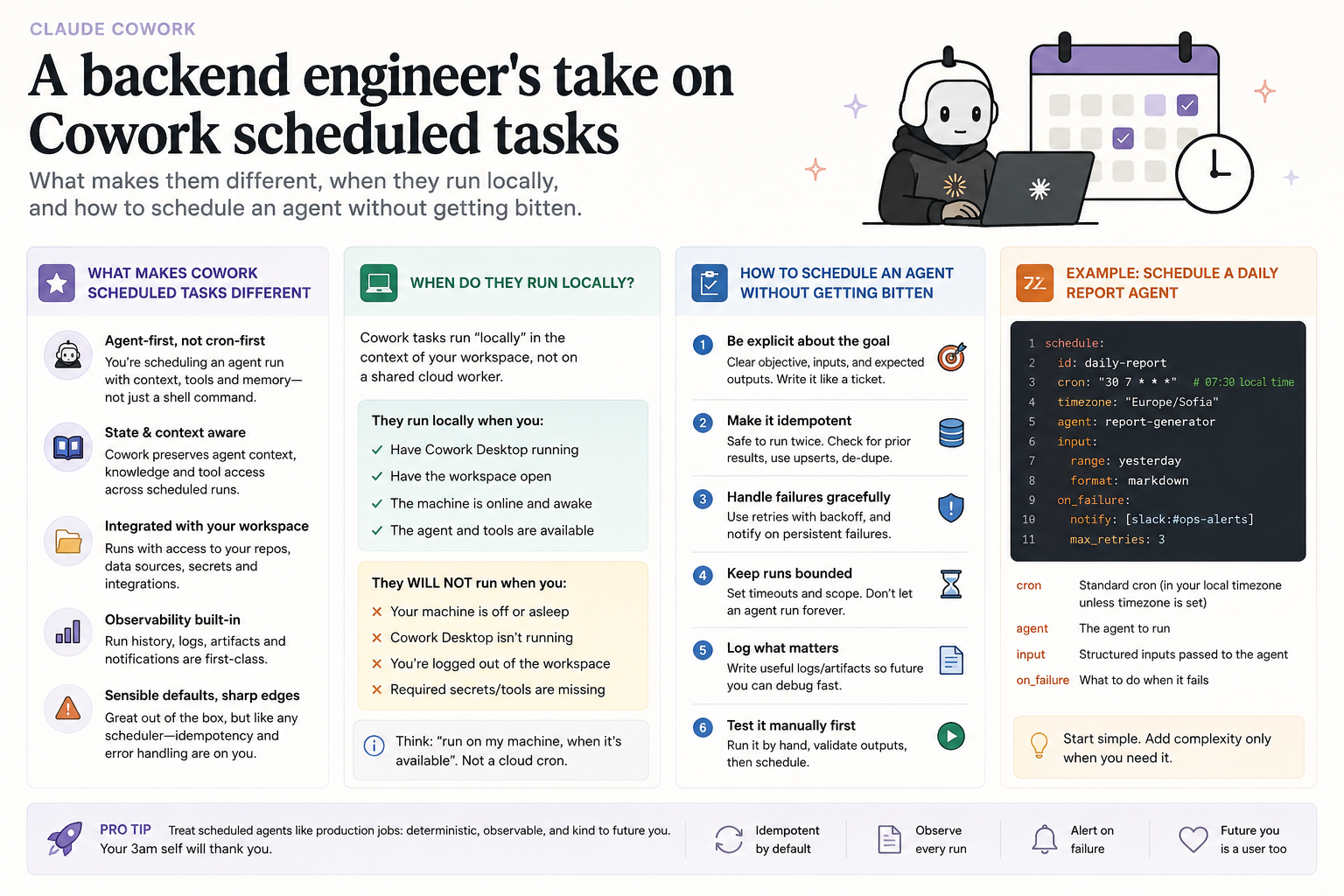
Task scheduling in Cowork: running an agent on a schedule on your local machine
For over ten years I've been shipping backend services, and in that time I've scheduled recurring work every way there is — cron on Linux, Windows Task Scheduler, Hangfire and Quartz.NET inside .NET apps, timer triggers in Azure Functions. The mechanics of "run this every morning at 8" stopped being novel a long time ago. So when Cowork shipped scheduled tasks, my first reaction was a shrug: another scheduler, big deal.
It took a day of using it to see why this one is a different animal. A classic scheduler fires a deterministic script — same lines of code, same output, every time. A scheduled task in Cowork fires an agentic loop. Each run spins up a fresh Cowork session that reads context, calls tools, reasons over the results, and writes an output. You're not running a script — you're running a capable agent that makes decisions along the way. That's the difference between "copy these files" and "tidy this folder the way I usually tidy it".
Local or remote — the detail that matters. There's a nuance here worth stating honestly, because it's easy to miss. By default, scheduled tasks in Cowork run remotely, on Anthropic's infrastructure. Because of that, they fire on schedule even when your computer is asleep or the Claude Desktop app is closed. Convenient for things like a morning brief pulled from your calendar and Slack.
But there's a boundary: if a task needs local files or local apps, it runs locally, on your own machine. Then the rules flip — the computer has to be awake and Desktop running for the task to fire. That's the mode I find most interesting. Working with sensitive data you don't want leaving the machine, folders on disk, local tools — all of it lives in local execution. If, like me, you insist that certain things stay on your own hardware, this is the mode you care about.
Creating a task. You need a paid plan (Pro, Max, Team, or Enterprise) and an up-to-date Cowork — it's still in beta, so I make sure the app is updated first. From there, two paths.
- Create with Claude. Go to "Scheduled" in the left sidebar, click "New task", and pick "Create with Claude". A session opens where you simply describe what you want. Claude often asks a few multiple-choice questions, then shows you the task's name, its schedule, and exactly what it will do. You confirm with the "Schedule" button and you're done.
- Set up manually. Same "New task", but "Set up manually". In the modal you fill in a task name, the prompt with your instructions, the approval mode, the frequency (hourly, daily, weekly, weekdays only, or manual), optionally a model, and optionally a folder for Claude to work in. The moment you point it at a local folder or the task touches local files, it moves into local mode.
One detail that can bite you: there's no step-by-step approval during a scheduled run. Claude follows the instructions you gave at setup without asking about each action. So I write the prompt defensively — spelling out what to do and what not to do, especially when a task creates, moves, or deletes files. And I always hit "Run now" before trusting the schedule. A broken scheduled task runs broken every single day.
Managing tasks. Everything lives under "Scheduled" in the sidebar. From there you see active tasks, review past and upcoming runs, open a task to edit its instructions or cadence, pause and resume, delete, or run it on demand. The run history is useful — with an agentic loop the output varies slightly between runs, so I keep an eye on whether quality is drifting.
A concrete example. A task I run locally: every weekday morning it reads a folder of notes on disk, summarizes what I flagged the day before as unfinished, and writes a short markdown file with what deserves attention today. Three minutes of Claude's time instead of twenty of mine. And because it's local, the notes never leave the machine.
As an engineer, though, I look at this clearly. The agentic scheduler is excellent for work where small variation is acceptable — summaries, briefings, tidying, topic research. I wouldn't put it in place of a hardened cron or systemd timer for critical, deterministic work where every run must be identical. I make the tasks idempotent (output named by date so nothing gets overwritten), have them write a log for each run, and never let a failure pass silently. Not because the tool is weak — but because I know where its territory ends.
The psychology behind my background makes me read this not as saved minutes but as offloaded mental weight. The expensive part of recurring work is rarely the doing — it's remembering to do it, the small decision made again and again. That's exactly the weight a well-tuned scheduler lifts. The same pattern I see in my work on habits: the value isn't one big effort, it's removing the friction from the thing that should just quietly happen on its own.
Comments (0)