
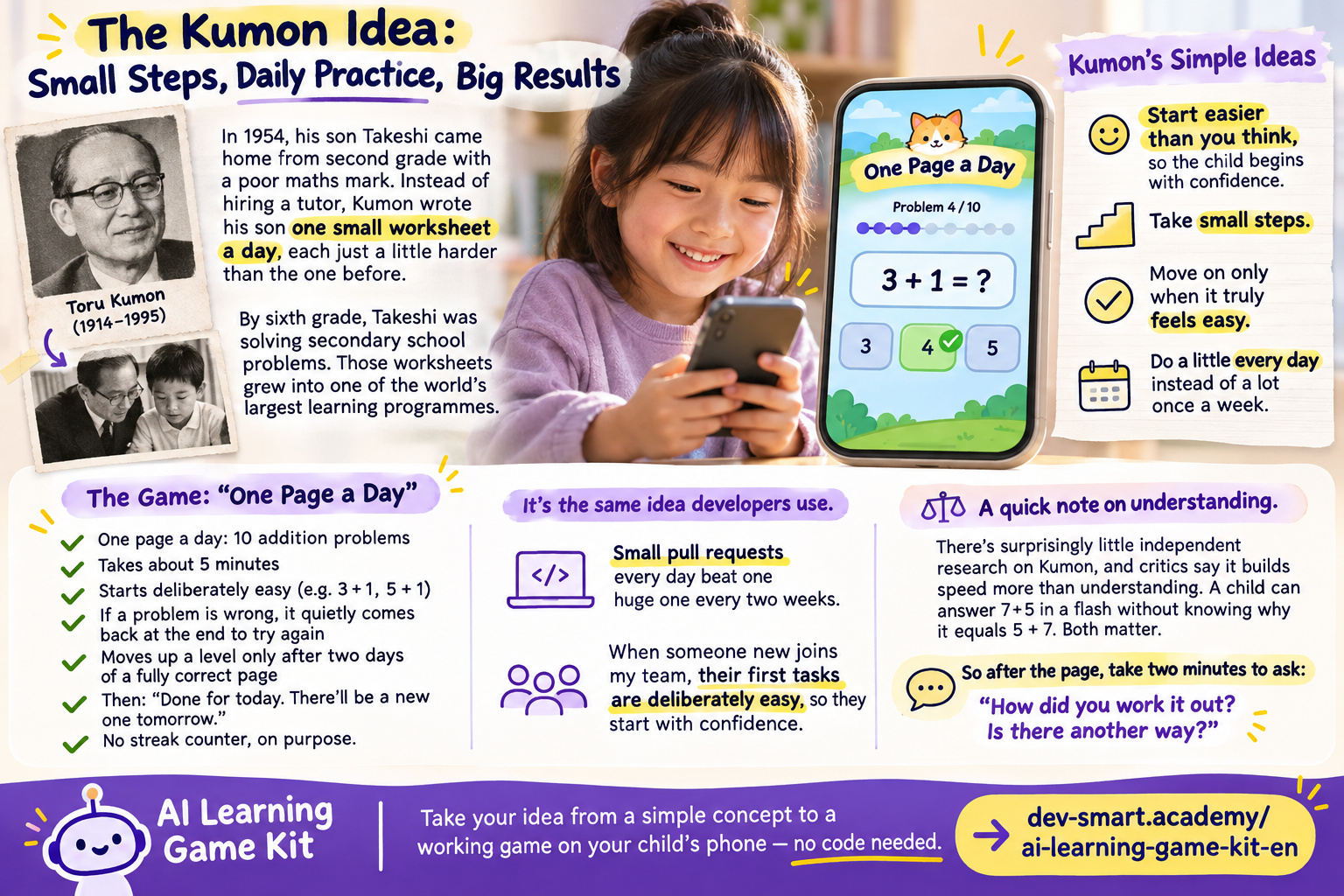
A Kumon Game: One Page a Day
When a child struggles with maths, our first thought is usually to give them more problems at the same hard level. Or to explain again. Toru Kumon did the opposite. He took the child back to problems that felt easy. And only from there did he start climbing, slowly, a little every day.
Who Kumon was
Toru Kumon was a Japanese secondary school maths teacher in Osaka. In 1954 his son Takeshi, in second grade, brought home a poor maths mark. Kumon didn't hire a tutor or buy a textbook. He sat down and started writing his son small worksheets, one a day. Each was just a little harder than the last. By sixth grade, Takeshi was solving secondary school problems.
Kumon opened the first centre in Osaka in 1958. Today the programme is used in dozens of countries, and millions of children learn with it.
The principles
Kumon's ideas are few and simple.
The first is the comfortable starting point. A child doesn't start at their school level, but lower, with problems they can solve easily and quickly. It looks like a waste of time, but the aim is different: for the child to start with confidence, not fear.
The second is small steps. Each worksheet is only a tiny bit harder than the last. The child hardly notices they're making progress.
The third is mastery before moving on. The child moves to the next level only when they solve the problems correctly and without effort. Not when they "more or less get it".
The fourth is a little every day. Not three hours on Saturday, but twenty minutes every day. And the fifth: the child learns on their own. The worksheet is designed so they can solve it without an adult beside them.
The engineering side: small pull requests
Every developer has seen a huge pull request: three thousand lines of changes, two weeks of work, all at once. Nobody can review it properly, and bugs slip through unnoticed. And everyone has seen the opposite: small changes, every day, each reviewed in five minutes.
The second kind leads to better code, not because people are smarter, but because small steps are easy to check and a mistake gets caught right away. There's another parallel too. When someone new joins my team, their first tasks are deliberately easy. Not because they can't do more, but because we want them to start with confidence. That's Kumon's comfortable starting point.
The game: "One Page a Day"
The learning goal is mental addition up to 10, then up to 20, learned in small steps and with confidence. The game is simple, on purpose.
- The starting point. For the first two or three days, the game gives problems that are easier than your child can manage. For example, just "+1": 3+1, 5+1, 7+1. You can choose the starting level, but the game advises: "Start easier than you think."
- One page. Each day there's just one page of ten problems. Your child picks the answer from a few large buttons. It takes about five minutes.
- Fix it yourself. If your child makes a mistake, the game doesn't say "wrong". The problem simply comes back at the end of the page. Your child solves it again, with no hint. That way they correct the mistake themselves.
- The next step. The game moves to the next level, such as "+2", only when your child solves the whole page correctly and without struggling two days in a row. If not, tomorrow brings a similar page at the same level.
- Tomorrow. After the page, the game says: "Done for today. There'll be a new one tomorrow." It gives no points and doesn't count streaks. If you skip a day, nothing is lost.
For the parent, there's a small screen showing the level and which problems were hard. And one sentence at the top: "If your child doesn't want to play, stop for a few days."
How to make it with the AI Learning Game Kit
This game is made with the AI Learning Game Kit. Choosing an answer from a few buttons is the job of the "Pick the Correct Answer" foundation. The kit's example game "Space Math", for addition and subtraction up to 20, is built on it and makes a good starting point.
- Upload the workspace from the kit to ChatGPT Work and add the AI Parent Game Coach skill. It takes the foundation, checks it and prepares it for a phone.
- Paste the prompt below. It describes the game the way a parent would. The skill takes care of the rest.
- Try the game and say what to change, such as "fewer problems per page" or "bigger buttons". Then repeat.
- When you're happy, follow the publishing guide in the kit until the game is an icon on your phone.
The prompt
Use $ai-parent-game-coach and the "Pick the Correct Answer"
foundation to build a new game for my child.

Child: 5–8 years old, counts to 20.
Learning goal: mental addition up to 10, then up to 20, learned in
small steps and with confidence.
Idea: based on Toru Kumon: a comfortable starting point, small steps,
mastery before the next level, a little every day.
Language: English and Bulgarian.
Session: about 5 minutes, one page a day.

Levels (small steps): +1 up to 10, +2 up to 10, +3 up to 10, mixed up
to 10, +1 up to 20, +2 up to 20, and so on.

Start: the parent chooses the starting level. A tip on screen: "Start
easier than you think."

Each day, one page of 10 problems. A large problem at the top (for
example "5 + 1") and 3 large answer buttons.

Wrong answer: no "wrong". The problem quietly comes back at the end
of the page, and my child solves it again, with no hint.

Next level: only when my child has solved the whole page correctly,
with no problems coming back, two days in a row. Otherwise, the next
day brings a similar page at the same level.

After the page: "Done for today. There'll be a new one tomorrow." The
next page unlocks the next day.

A parent screen (behind a button): the current level and which
problems were hard. At the top: "If your child doesn't want to play,
stop for a few days."

No points, stars, timer, "well done" or streak counter. Progress is
stored on the device only. Large buttons, works on a phone. No ads,
accounts or data collection.

Then get it ready so I can open it on my phone and publish it.
One note. The AI often adds a streak counter, because that's how many apps work. Here we explicitly don't want one. A streak counter makes a child afraid of missing a day, and the goal is the opposite: learning without fear.
Honest about the limits
Kumon is a huge programme, but there's surprisingly little independent research on it. Much of the data comes from the organisation itself. We don't know well how much it helps compared with other ways of learning.
Second, Kumon has serious critics. The programme teaches procedures and speed, but hardly teaches understanding. A child can solve "7 + 5" in a flash without knowing why 7 + 5 is the same as 5 + 7. In the article on Constance Kamii, I wrote about the opposite view: children should discover arithmetic for themselves, not memorise it. The truth is that both are needed. Understanding and fluency grow together and support each other.
And third, daily worksheets can become boring or turn into a chore. Some children hate them. That's why the game has no streak counter, and why it explicitly tells the parent to stop if the child doesn't want to play.
So this game is only half of it. The other half is the conversation: "How did you work out 5 + 3? Is there another way?" Five minutes of fluency, then two minutes of why.
Start easier than you think. Confidence is a better beginning than a hard problem.
Comments (0)